
Start from the evidence
Use governed records as the basis for a draft your reviewers can check.
Agentic Studio · Evidence into reporting
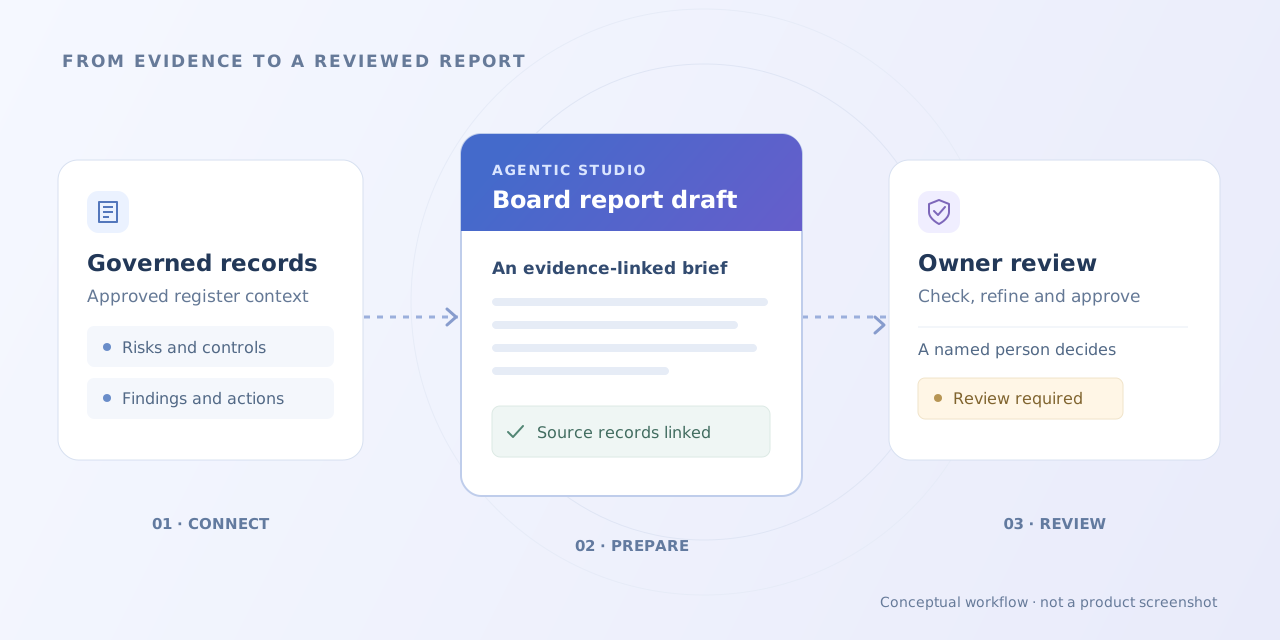
Start with the records your governance team already maintains. Agentic Studio prepares assessment, board report and regulatory submission drafts, giving reviewers the evidence, open questions and approval path they need to make the report their own.
Built for your institution. Shaped around your data.
Draft the assessment of our supplier-review control.
Use governed records as the basis for a draft your reviewers can check.
Bring the important findings, missing information and decisions into the report.
Named owners review the reasoning and authorise the final output.
SEE IT IN ACTION
See how the same evidence can support different reporting conversations.
Prepare an assessment draft that separates supported observations from questions still waiting for evidence.
Interactive example with fictional data. The product’s configuration and interface may differ.
Draft assessment: the review procedure defines the required control, but completion evidence is missing for the selected period. The reviewer should request that evidence before concluding that the control operated effectively.
A useful draft makes the missing evidence hard to overlook.
Supplier review · Procedure defined
Fictional record for this example.Current assessment period · Operating effectiveness
Fictional record for this example.Completed review record · Not supplied
Fictional record for this example.Turn register detail into a draft narrative that helps the committee see what needs attention.
Interactive example with fictional data. The product’s configuration and interface may differ.
Draft committee summary: continuity risk remains above appetite while the recovery action is open. The action owner has proposed a revised exercise date. The committee is asked to review the interim response and the outstanding exposure.
The report leads with the decision the evidence calls for.
Continuity risk · Above appetite
Fictional record for this example.Recovery exercise · Revised date proposed
Fictional record for this example.Interim response and remaining exposure · Decision requested
Fictional record for this example.Assemble working submission material with the source set and release responsibility in view.
Interactive example with fictional data. The product’s configuration and interface may differ.
The draft includes the requested assessment and action summary. One evidence reference still needs confirmation. The compliance reviewer must resolve it before the named owner can approve the package for authorised submission.
The draft moves forward with its remaining responsibility clearly marked.
Assessment and action summary · Included
Fictional record for this example.Evidence reference E-12 · Confirmation pending
Fictional record for this example.Compliance review, then accountable owner approval
Fictional record for this example.THE CAPABILITIES BEHIND IT
Build the report from the evidence lifecycle your team already maintains. Give reviewers a structured draft and a clear route back to the records behind the narrative.
Risk, compliance, assurance and governance teams preparing recurring assessments and oversight material.
Use selected Aliph Risk & Compliance records as the starting point. Define the reporting period, organisational scope and source set so a reviewer can understand what the draft covers.
Bring relevant requirements, control tests and findings into an assessment draft. Keep the evidence and unresolved questions in view while specialists evaluate the reasoning and conclusion.
Organise register information into a narrative for the intended committee or decision-maker. Surface the matters that need attention, with supporting records available for closer review.
Prepare working submission material from the selected records and reporting structure. Specialist review and named approval remain required before the package is released through the institution’s authorised process.
Identify who checks the source information, who resolves a gap and who accepts the final output. Build correction, rejection and approval into the reporting workflow.
Connect the selected inputs, draft and review decisions. Maintain the context needed to understand which record set informed the report and why the final wording was accepted.
Set the purpose, audience, reporting period and expected structure. Name the reviewer and the owner authorised to approve the output.
Choose the requirements, risks, controls, tests, findings and actions relevant to the scope. Check completeness before drafting.
Develop an assessment or reporting narrative from the selected information. Preserve source context and identify evidence that still needs attention.
Specialists check the facts, reasoning and scope. Correct the narrative and resolve missing or conflicting information with the record owners.
The named owner accepts the final version. Release or submission follows the institution’s authorised process and the permissions established for the workflow.
YOUR DATA. YOUR DECISIONS.
Connect the source register, reporting structure and decision rights. Make a familiar review process easier to run without changing who is accountable for its conclusions.
Explore the Aliph approachUse the sections, reporting periods and evidence expectations your committee or assessment requires.
Select the register information behind each report and preserve the context needed to inspect it.
Keep correction, rejection and final approval with the people authorised to accept the output.
Bring the existing report, its source register and the questions its audience expects it to answer. Identify recurring sections, manual interpretation and common evidence gaps.
Set the reporting scope, record selection and completeness criteria. Assign the people who validate evidence, correct the draft and authorise release.
Evaluate drafting with representative records, missing evidence and late changes. Prepare the team to maintain reporting structures, model settings and permissions through a controlled change process.
What to evaluate. Check whether the draft accurately represents the selected register and reporting period. Assess source support, completeness, treatment of unresolved findings and review effort. Test rejection, corrected records and attempts to release material before named approval.
A LITTLE MORE CONTEXT
No. Aliph Risk & Compliance provides the underlying records and evidence lifecycle. Agentic Studio uses those governed inputs to prepare assessments and reporting material, keeping the report connected to its source.
The product focuses on assessments, board and oversight reports, and regulatory submission drafts. The implementation defines the report structures, input records and review responsibilities appropriate to the institution.
A named owner authorised by the institution approves the output. Specialists check evidence and interpretation first, and unresolved issues follow the agreed escalation path. The AI-generated document remains a draft until the required review and approval are complete.
The product prepares draft submission material. Final approval and submission authority remain with the institution. Any export, integration or release action must be explicitly included in the approved workflow.
The workflow should expose the gap and direct it to the responsible owner. Reviewers decide whether additional evidence is needed, a limitation must be stated or the report should wait before approval.
YOUR NEXT CHAPTER
We’ll connect its sections to the register and show where a first draft can give reviewers a better starting point.